Building a Multilingual Support Agent with Tiny Aya
- Geoffrey Harrazi
We built a complete multilingual support agent with Cohere Labs' 3.35B Tiny Aya, then benchmarked it against models 8-10x its size on technical translation. Here is what we learned.

A 3.35B-parameter model, a LangGraph agent, and an open-source platform walk into a support queue. What follows is a surprisingly competitive multilingual pipeline.
When every ticket is a language problem
Enterprise support does not happen in one language. A French engineer files a bug report with a full stack trace. A Turkish operations team submits a ticket about a failing backup schedule, complete with cron expressions and log excerpts. A Japanese developer describes a memory leak, referencing heap dumps and JVM flags.
Before anyone can triage, classify, or respond to these tickets, someone (or something) needs to understand them. And understanding a multilingual technical support ticket is harder than it sounds. You need to preserve error codes, API endpoints, SQL fragments, and the causal reasoning that makes a bug report actionable. Translate "le serveur renvoie une erreur 504" wrong and you lose the status code. Paraphrase a stack trace and you lose the debugging path entirely.
The standard approach is to route everything through a large model API, typically 30B+ parameters on a cloud endpoint. It works. It is also slow (10 to 30 seconds per request), expensive at scale, and creates a hard dependency on external infrastructure.
We wanted to see if we could build a complete multilingual support agent powered primarily by a 3.35B-parameter model. Language detection, translation, verification, classification, all running fast enough for real-time triage.
Enter Tiny Aya
When Cohere Labs released Tiny Aya in February 2026, it caught our attention. Most multilingual models at this scale treat language coverage as a checkbox: they support many languages, but performance degrades sharply outside English and a few high-resource languages. Tiny Aya does something different.
Rather than spreading thin, Tiny Aya covers 67 languages with instruction-tuned variants that specialize in different linguistic regions:
- TinyAya-Global: the generalist, balanced across all 67 languages.
- TinyAya-Earth: Africa and West Asia (Arabic, Turkish, Swahili, Amharic, Hausa, etc.)
- TinyAya-Fire: South Asia (Hindi, Bengali, Tamil, Urdu, etc.)
- TinyAya-Water: Asia-Pacific and Europe (French, Japanese, Chinese, Portuguese, Spanish, Korean, etc.)
This structure immediately suggested an architecture. Instead of picking one model and hoping it works everywhere, we could run the global model as a baseline while simultaneously running the specialized variant for the detected language. Two translations, one verification step, best output wins.
Worth noting: Tiny Aya's tokenizer was designed to reduce fragmentation across scripts. Where other multilingual tokenizers produce long token sequences for non-Latin scripts (slower inference, more memory), Tiny Aya gets significantly fewer tokens per sentence. That directly means faster inference and lower memory usage.
The agent architecture
We built the agent as a LangGraph workflow. Each node does one job and passes state forward. Here is the full pipeline:
START
  ├── fetch_ticket ──────────┐
  │                          ├── detect_language ──┬── translate_global ──┐
  └── fetch_categories ──────┘                     └── translate_sub ─────┤
                                                                          ├── verify_translation ── classify ── update_ticket
                                                                          │                                           │
                                                                          │                                          END
Eight nodes, three parallelization points, two model families.
Fetching context
The pipeline starts with two parallel operations: fetch_ticket retrieves the ticket from Jira, and fetch_categories queries the project for available category labels. Both use MCP tools to interact with Jira.
async def fetch_ticket(state: TicketState) -> FetchTicketResult:
    tools = await load_mcp_tools()
    tool = get_tool("jira_get_issue", tools)
    result = await tool.ainvoke({"issue_key": state["ticket_key"]})
    # Parse summary + description from the response
    ...
MCP (Model Context Protocol) is an open standard for connecting agents to external tools. Instead of writing a Jira API client, we declare the tools we need and use them as standard LangChain tools. Agent code stays focused on business logic.
Language detection
detect_language uses TinyAya-Global to identify the source language, then resolves it to the appropriate regional variant:
_global_model = create_tiny_aya(TinyAyaVariant.GLOBAL)

def detect_language(state: TicketState) -> DetectResult:
    response = _global_model.invoke(
        [HumanMessage(content=f"What language is this? Answer in English: {state['ticket_text']}")]
    )
    # Match response against supported languages
    language = next(
        (lang for lang in _SUPPORTED_LANGUAGES if lang.lower() in raw.lower()),
        None,
    )
    variant = get_variant_for_language(language)
    return DetectResult(detected_language=language, sub_variant=variant)
The routing map:
LANGUAGE_TO_VARIANT = {
    "French": "water",    "Arabic": "earth",    "Hindi": "fire",
    "Turkish": "earth",   "Japanese": "water",  "Chinese": "water",
    "Portuguese": "water", "Spanish": "water",   "Swahili": "earth",
    "English": "global",
}
Dual translation
After language detection, the pipeline forks into two parallel translation paths:
translate_global runs the ticket through TinyAya-Global. Broadest training data, most consistently formatted output across languages.
translate_sub runs the same ticket through the detected regional variant (Earth, Fire, or Water). Deeper linguistic grounding for its target languages, potentially better at capturing nuances.
Both run concurrently with the same system prompt:
_SYSTEM_PROMPT = (
    "You are a professional translator. "
    "Translate the following text to English. "
    "Output ONLY the English translation, nothing else. "
    "Do not add notes, explanations, or commentary."
)
Cohere Labs built the regional variants for "stronger linguistic grounding and cultural nuance" while the global model provides a "consistent multilingual backbone." We wanted to see if combining both would beat either alone.
Verification
verify_translation receives both outputs and uses TinyAya-Global as arbiter. It picks the better translation, with a bias toward the regional variant when they conflict:
_USER_PROMPT = (
    "Below are two English translations of the same text.\n\n"
    "Translation A:\n{global_translation}\n\n"
    "Translation B:\n{sub_translation}\n\n"
    "Pick the better translation. If they conflict, pick Translation B. "
    "Write ONLY the final English translation below, no explanation:\n\n"
    "Final translation:"
)
The bias toward Translation B reflects the idea that when two models disagree, the specialist's interpretation is more likely correct. As we will see in the eval section, that turned out to be more nuanced than expected.
Classification and update
Once we have a verified English translation, the pipeline leaves Tiny Aya's domain. classify uses Gemini 3 Flash to assign a category and priority (Critical/High/Medium/Low). We use Gemini here because classification is a reasoning task over English text, not a multilingual problem.
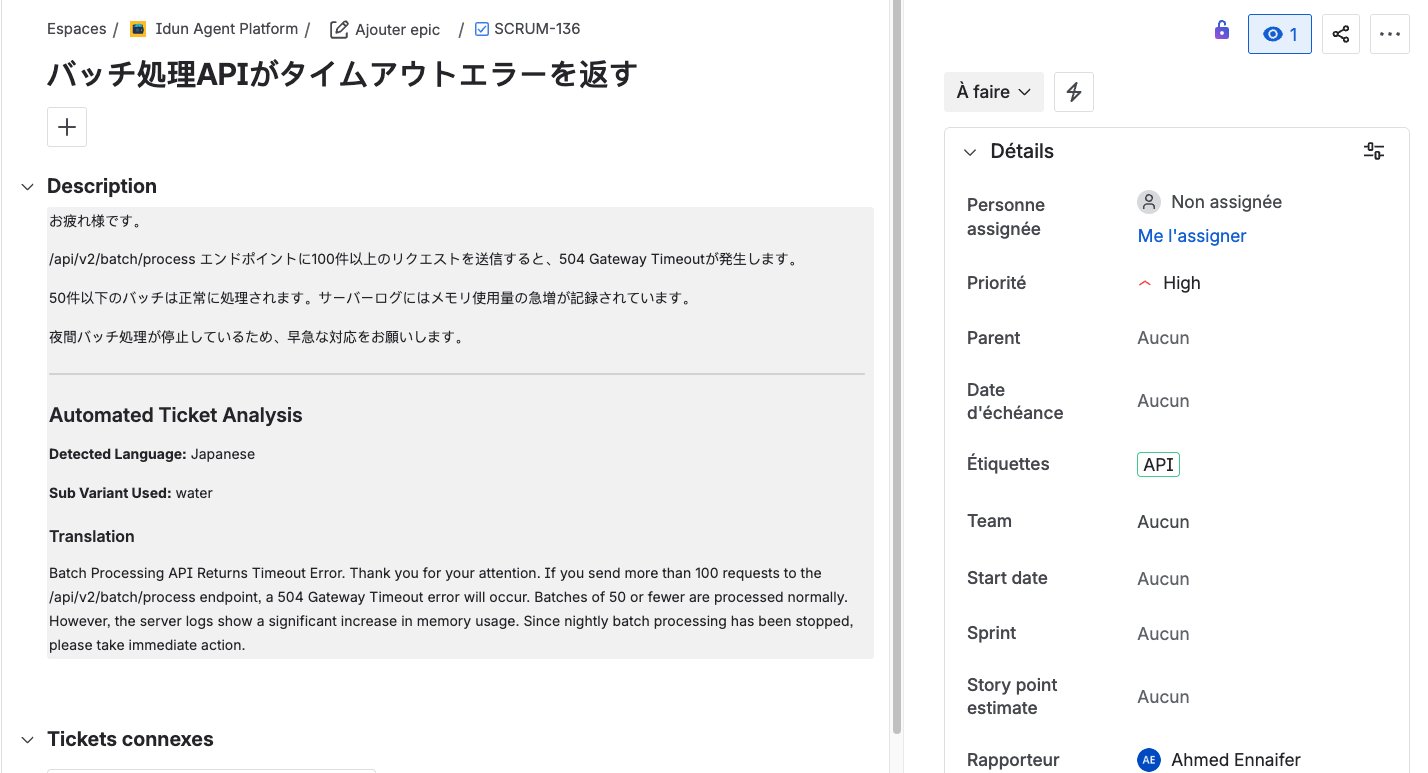
update_ticket writes everything back to Jira: detected language, variant used, verified translation, category, and priority. The original ticket is preserved, with the analysis appended.
Here is the agent processing a Japanese ticket end-to-end:

And the resulting Jira ticket with the analysis written back:
The state
The pipeline communicates through a typed state dictionary:
class TicketState(TypedDict, total=False):
    ticket_key: str
    ticket_text: str
    detected_language: str
    global_translation: str
    sub_translation: str
    verified_translation: str
    sub_variant: str
    category: str
    priority: str
    categories: list[str]
    updated: bool
Each node reads what it needs and writes its results back. LangGraph handles routing, parallelism, and state merging. total=False means nodes only set the fields they are responsible for.
From notebook to production with the Idun platform
Building a LangGraph agent that works locally is one thing. Running it as a production service with observability, access control, tool management, and a serving layer is another. Most teams spend more engineering time on this infrastructure than on the agent logic. We did not want to be most teams.
The Idun Agent Platform is an open-source agent governance platform that takes LangGraph or ADK agents and handles the production infrastructure: serving, tracing, MCP tool management, guardrails, RBAC, SSO.
Here is how we actually set it up.
Setting up the platform
Clone and start locally:
git clone https://github.com/Idun-Group/idun-agent-platform.git
cd idun-agent-platform
cp .env.example .env
docker compose -f docker-compose.dev.yml up --build
This spins up the full stack: management UI, agent runtime, observability backends, and supporting services. Fill in your API keys in .env before starting. The UI is at http://localhost:3000.
Registering the agent
Idun expects a LangGraph StateGraph, which is what our build_graph() already produces:
def build_graph(cli: bool = False) -> CompiledStateGraph | StateGraph:
    graph = StateGraph(TicketState)
    # ... add nodes and edges ...
    if cli:
        return graph.compile()
    return graph  # Idun handles compilation

app = build_graph()
The cli flag gives us dual-mode operation: compiled for local dev (uv run python -m src.main TICKET-123) and uncompiled for Idun, where the platform manages the runtime. Same code, no changes.
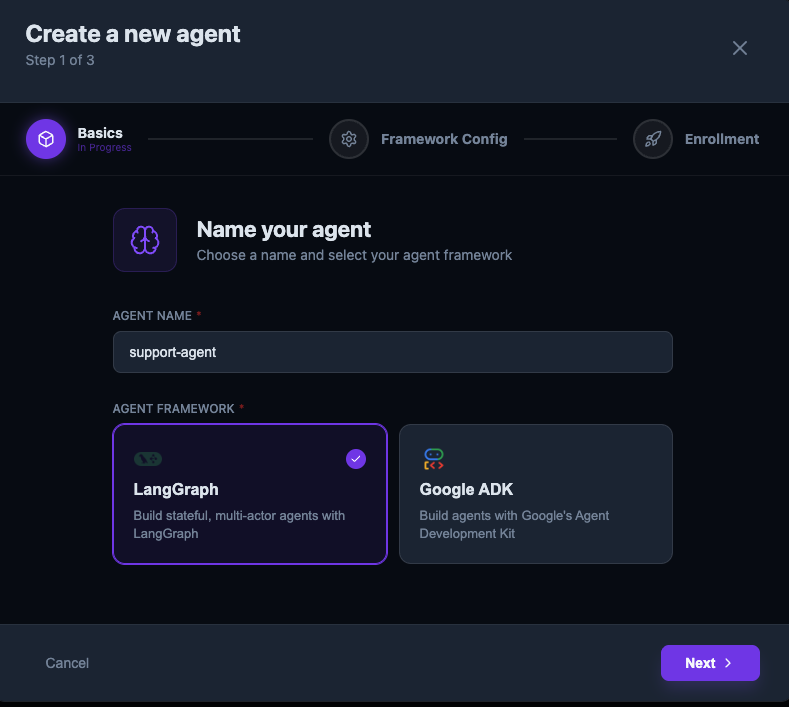
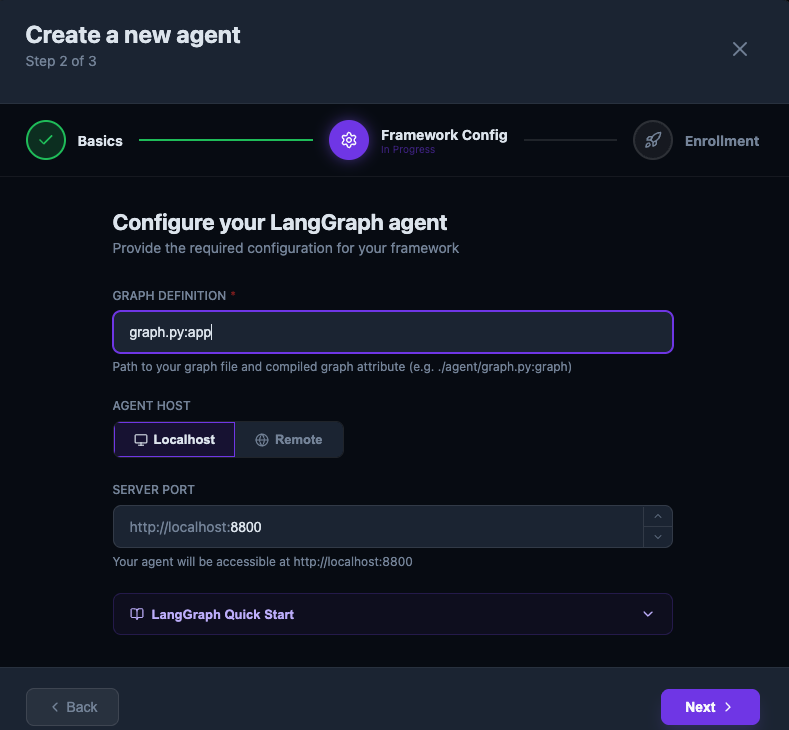
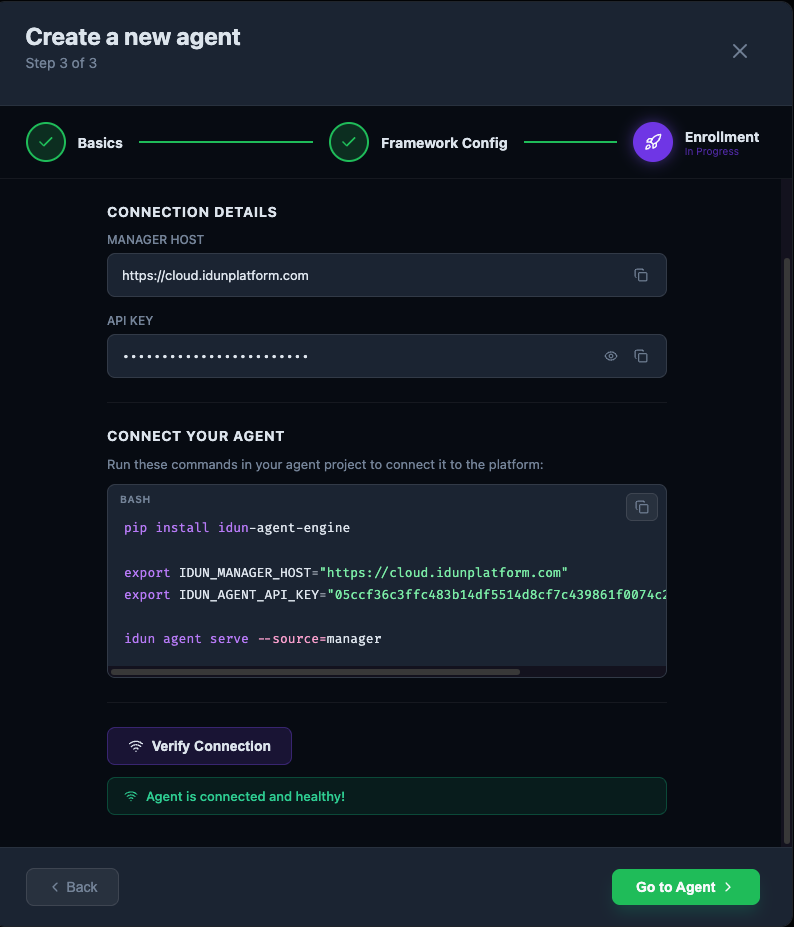
Registering takes a few clicks through the UI:
Step 1: name the agent and pick LangGraph:
Step 2: point at your graph definition (graph.py:app) and configure the host:
Step 3: enroll and verify the connection. Idun gives you the CLI commands to connect:
MCP tool integration
Our agent talks to Jira: fetching tickets, searching categories, writing results back. Without Idun, that means writing a REST client, handling auth, parsing responses, managing connections. A few hundred lines of integration code, minimum.
With Idun's MCP support, the Jira integration is declarative. Add your credentials to the MCP server's environment:
{
  "JIRA_URL": "your-jira-url",
  "JIRA_USERNAME": "your-mail",
  "JIRA_API_TOKEN": "your-jira-token"
}
Then load the tools:
from idun_agent_engine.mcp.helpers import get_langchain_tools

async def load_mcp_tools(config_path: str = "idun_config.yaml") -> list[BaseTool]:
    _tools = await get_langchain_tools(config_path=config_path)
    return _tools
Three lines. That gives us jira_get_issue, jira_search, and jira_update_issue inside the agent. No REST client, no auth boilerplate.
Create the MCP server through the UI with STDIO transport, pointing at mcp-atlassian:
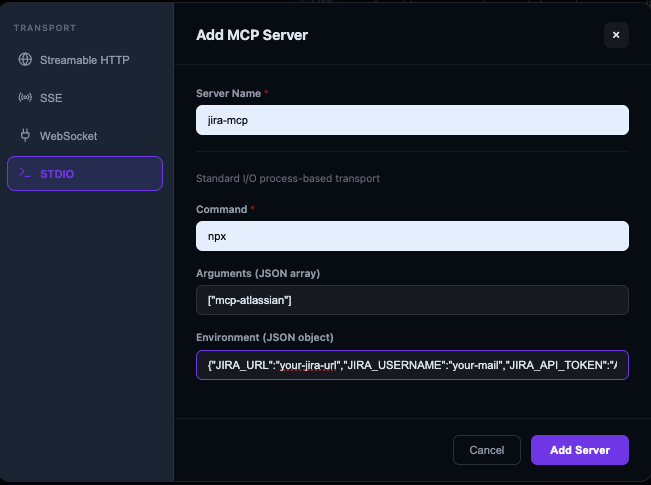
You can restrict which MCP tools each agent has access to, which matters when you are running multiple agents with different permission levels.
Observability with Langfuse
Building the agent was the fun part. Figuring out why a ticket took 30 seconds instead of 3, or why a translation came back empty, was the hard part.
Idun integrates with OpenTelemetry, Langfuse, Arize Phoenix, LangSmith, and Google Cloud Trace. We went with Langfuse because it traces actual prompt/completion pairs, token counts, and cost per model call, not just spans and durations.
Zero instrumentation code. Connect Langfuse through the UI:
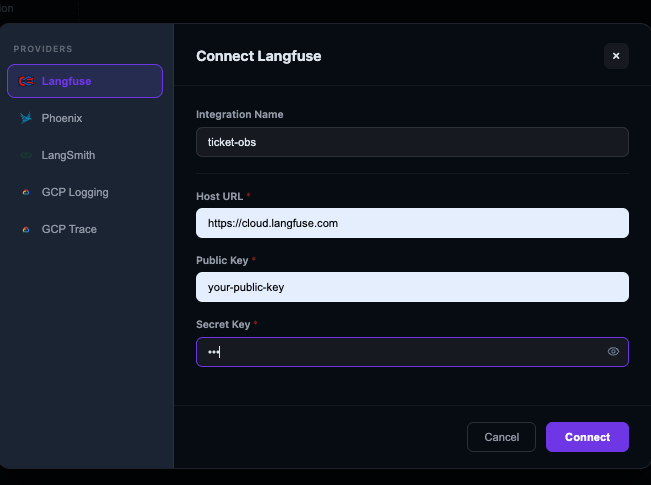
Every node execution, model call, and tool invocation gets traced automatically. You can drill into any span to see exact prompts, raw responses, token counts, and latency:
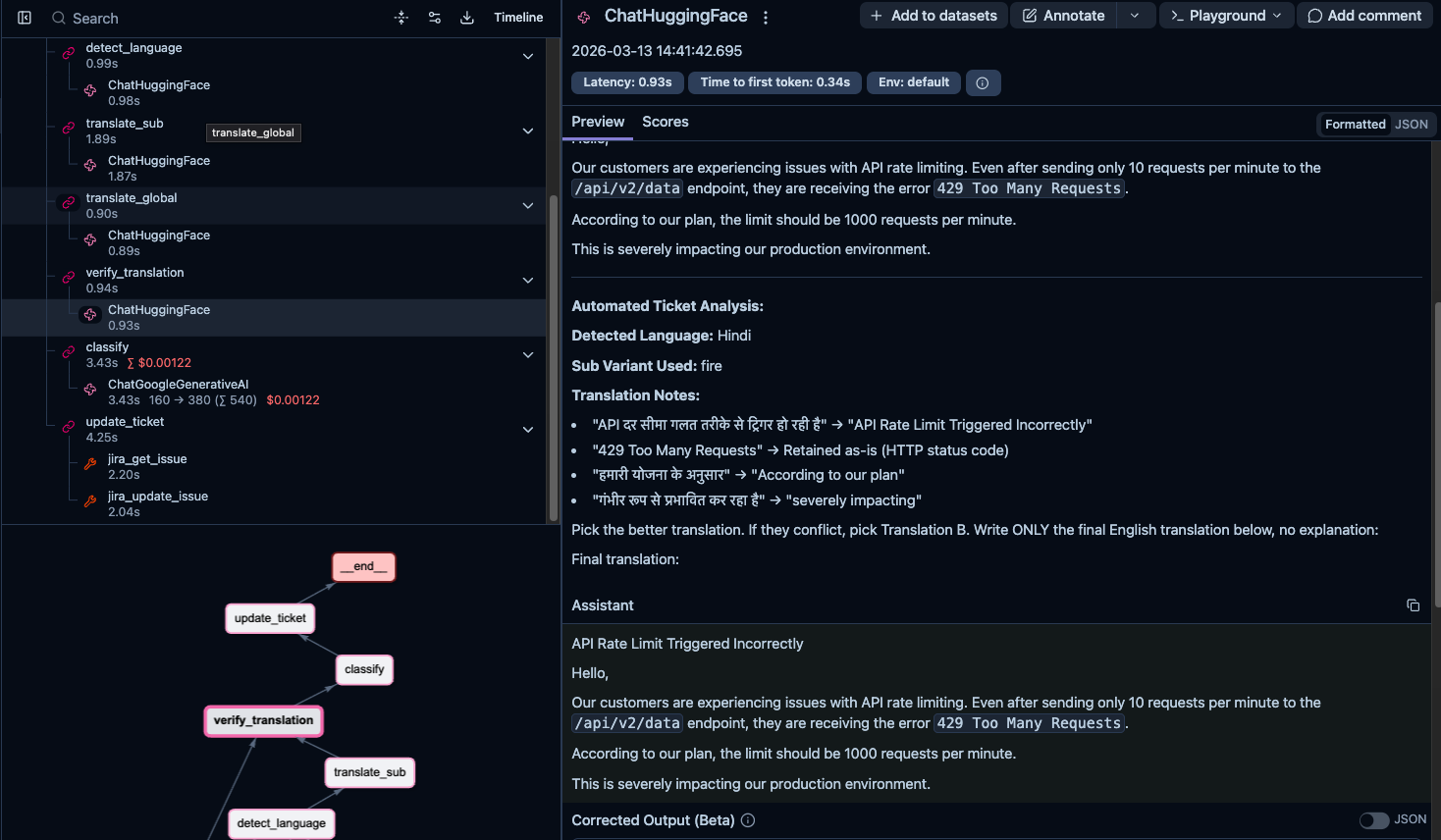
Some things we caught through traces:
- First translation call for each variant was much slower than subsequent calls. Turns out the HuggingFace Inference API was loading the model on first request. We started caching model instances.
- A ticket got a surprisingly low eval score. Tracing back through the spans showed the issue was in verification, not translation. The global model was mangling the sub-variant's output during comparison.
- The verification step was sometimes the slowest node, not the translation. The model was "deliberating" between two similar translations instead of quickly picking one.
Langfuse also gives aggregate metrics across executions: latency per node, error rates, token usage over time, cost breakdowns by model. When you are processing hundreds of tickets a day, that is how you know things are working.
Assigning resources to the agent
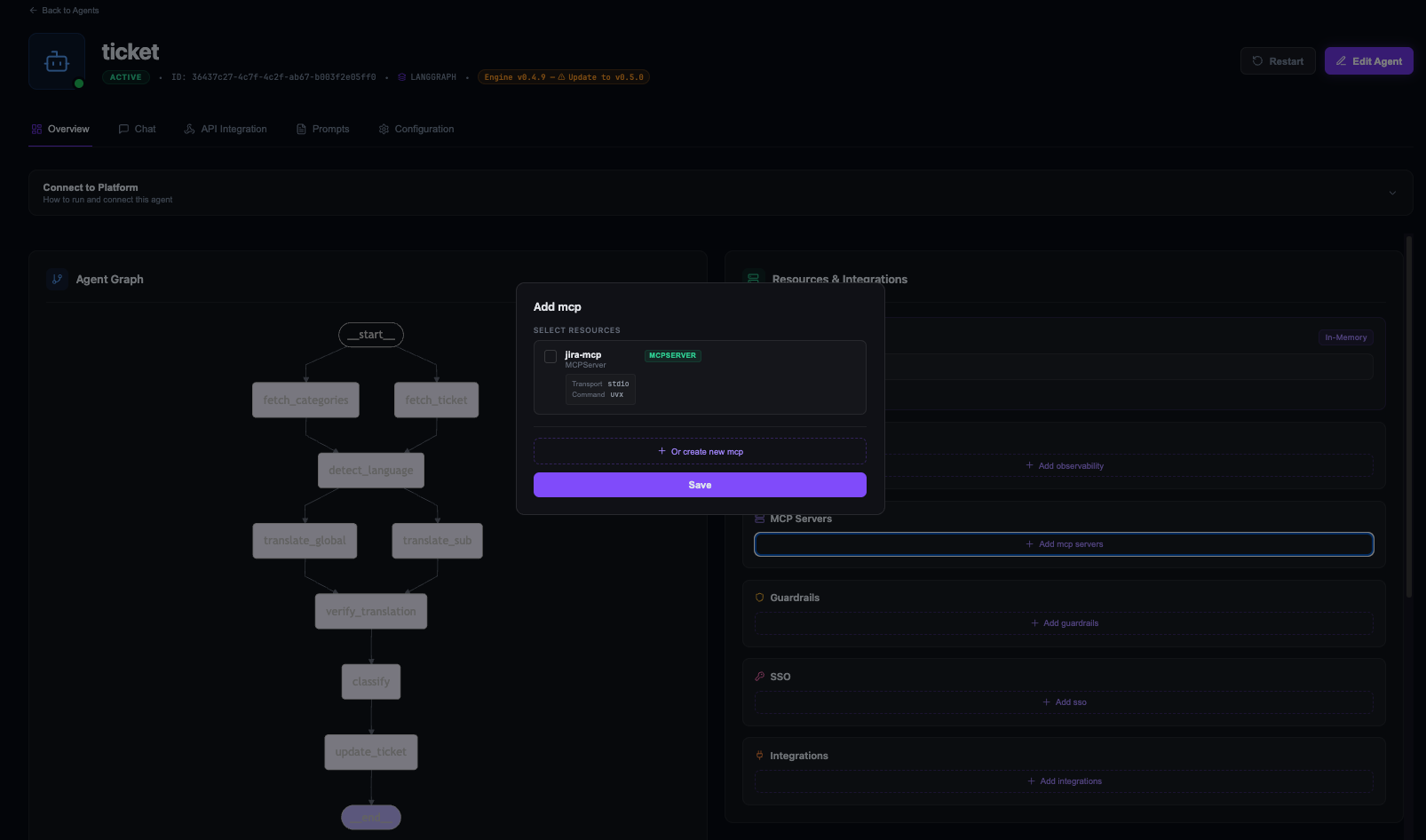
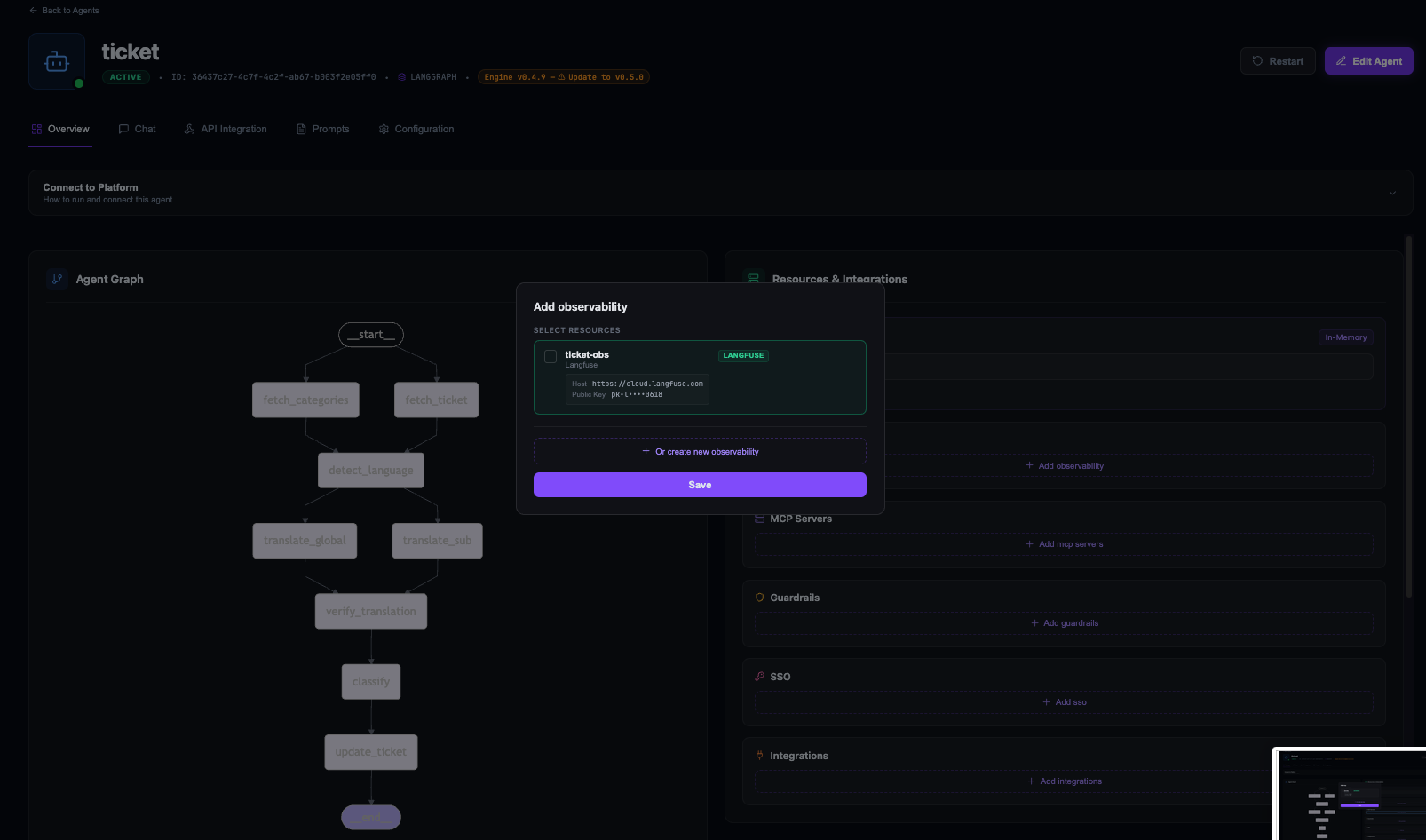
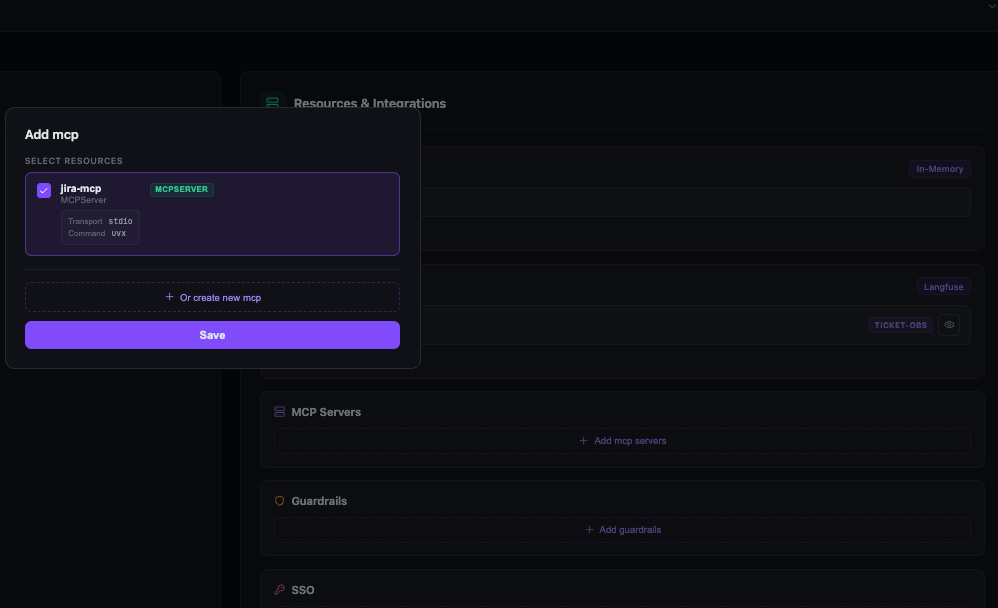
Creating MCP servers and observability providers is separate from assigning them to an agent. From the agent overview page, the Resources & Integrations panel lets you attach what the agent needs:
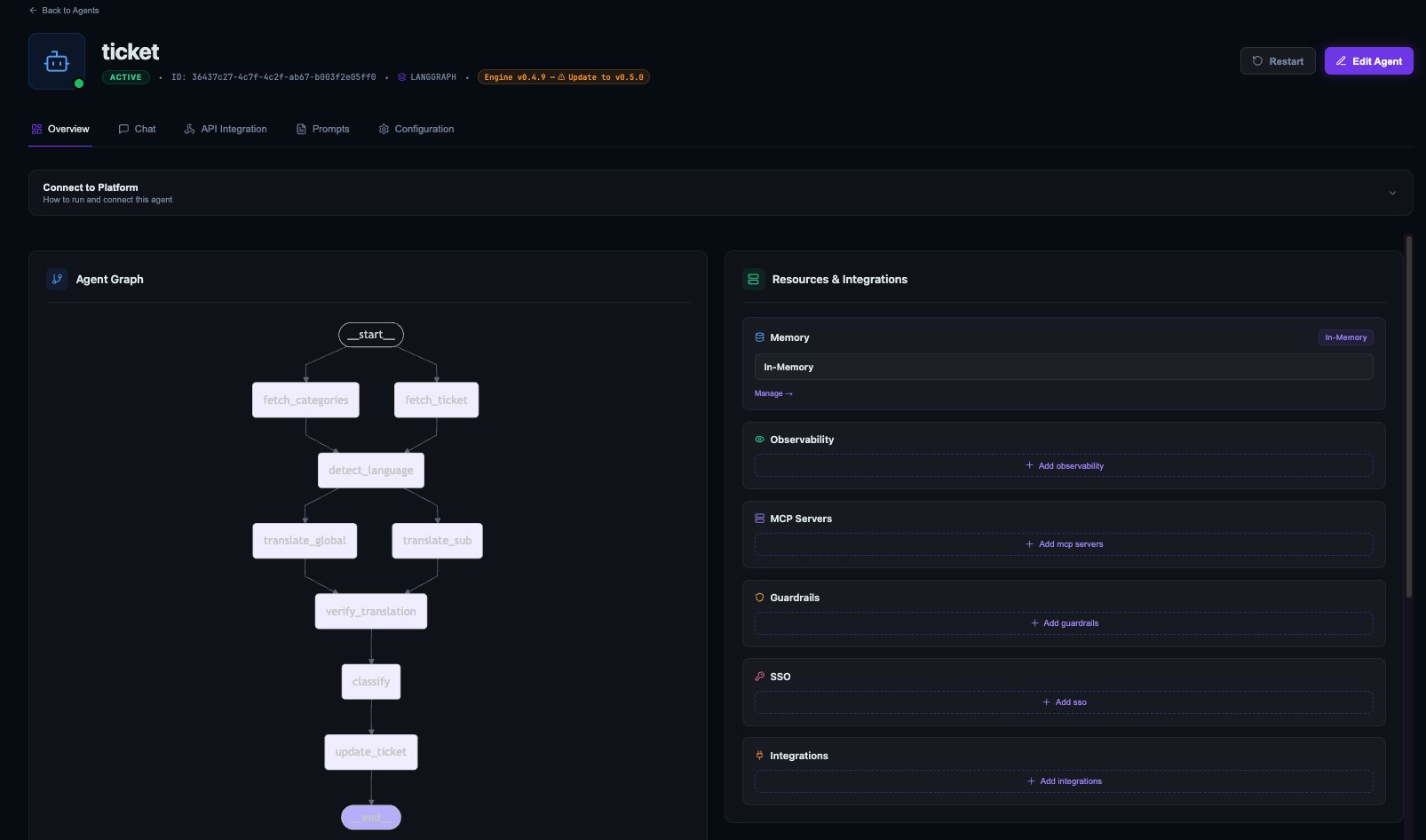
Assign the Jira MCP server:
Assign Langfuse:
Once both are attached:
Guardrails and access control
Idun has guardrail support for input/output policies: PII detection, prompt-injection defenses, topic restrictions, allowlists/blocklists. For a support ticket agent processing customer data, this matters.
The platform also supports SSO and RBAC. Internal support team gets full access, external integrations only submit tickets without seeing raw translations.
The development loop
What made this work in practice was the tight loop:
- Develop locally:
uv run python -m src.main TICKET-123, see results in terminal, iterate. - Deploy to Idun: push the same code, no modifications.
- Debug in Langfuse: open the trace, see what happened at each step.
- Fix and redeploy.
The value is not any single feature. It is that there is no friction between writing agent code and running it in production with full observability.
Evaluating translation quality
Building the agent was the easy part. We needed to know how Tiny Aya actually performs on technical content compared to models many times its size, so we built a systematic evaluation.
The dataset
40 technical support tickets across 10 languages: French, Spanish, Portuguese, Arabic, Turkish, Hindi, Japanese, Chinese, Swahili, and English (4 per language). Each ticket includes the kind of technical detail you would find in a real support queue:
- Stack traces and error logs: Python tracebacks, Java exceptions, Node.js errors with file paths and line numbers that must be preserved exactly.
- SQL queries and database details:
SELECTwithJOINclauses, index names,VACUUM FULL, specific table/column identifiers. - API endpoints and configuration: REST paths like
/api/v2/batch/process, env vars, config keys, HTTP status codes. - Numbers that must survive: error codes, port numbers, memory sizes (3GB, 12GB), thresholds (100 requests), durations (24-hour window).
- Causal reasoning: "When X happens, Y fails because Z." Break this chain and the ticket becomes useless.
The tickets were written in each language by native-level prompts, not machine-translated from English. Machine-translated test data would test the model's ability to reverse its own output, which is not what we wanted.
The judge
We used Gemini 3 Flash as an LLM judge through deepeval's GEval metric. Each translation scored on a 0 to 10 rubric (normalized to 0 to 1) with six criteria:
- Numbers: are all numbers preserved exactly?
- Technical identifiers: API endpoints, file paths, config keys, SQL snippets preserved verbatim?
- Completeness: any sentences or details missing?
- Factual accuracy: does the translation introduce incorrect information?
- Fluency: would a native English support engineer find it confusing?
- Coherence: logical structure maintained (numbered steps, cause-effect)?
We paired these with explicit score anchors using deepeval's Rubric class:
- 0 to 2: Unintelligible, wrong language, or missing most content
- 3 to 4: General topic captured but major errors
- 5 to 6: Understandable and mostly complete, but several errors
- 7 to 8: Accurate and fluent with only minor issues
- 9: Near-perfect
- 10: Flawless
This mattered. In early iterations, we only used evaluation steps with penalty-based scoring and every model scored nearly perfectly. The rubric gave the judge calibrated expectations for what each score level actually looks like.
The competitors
We evaluated Tiny Aya against models from 4B to 32B parameters, all through the Hugging Face Inference API:
| Model | Parameters |
|---|---|
| TinyAya-Global | 3.35B |
| TinyAya-Routed | 3.35B (regional variants) |
| Gemma3n-E4B | ~4B |
| Qwen3-4B | 4B |
| Qwen3-8B | 8B |
| Qwen3-32B | 32B |
| Qwen3.5-27B | 27B |
"TinyAya-Routed" is our routing pipeline that sends each ticket to the appropriate regional variant based on detected language. This lets us compare global-only against specialized routing directly.
Each model translated all 36 non-English tickets. We parallelized with pytest-xdist across models and ThreadPoolExecutor within each model's ticket set (3 threads, staying within HuggingFace rate limits).
The results
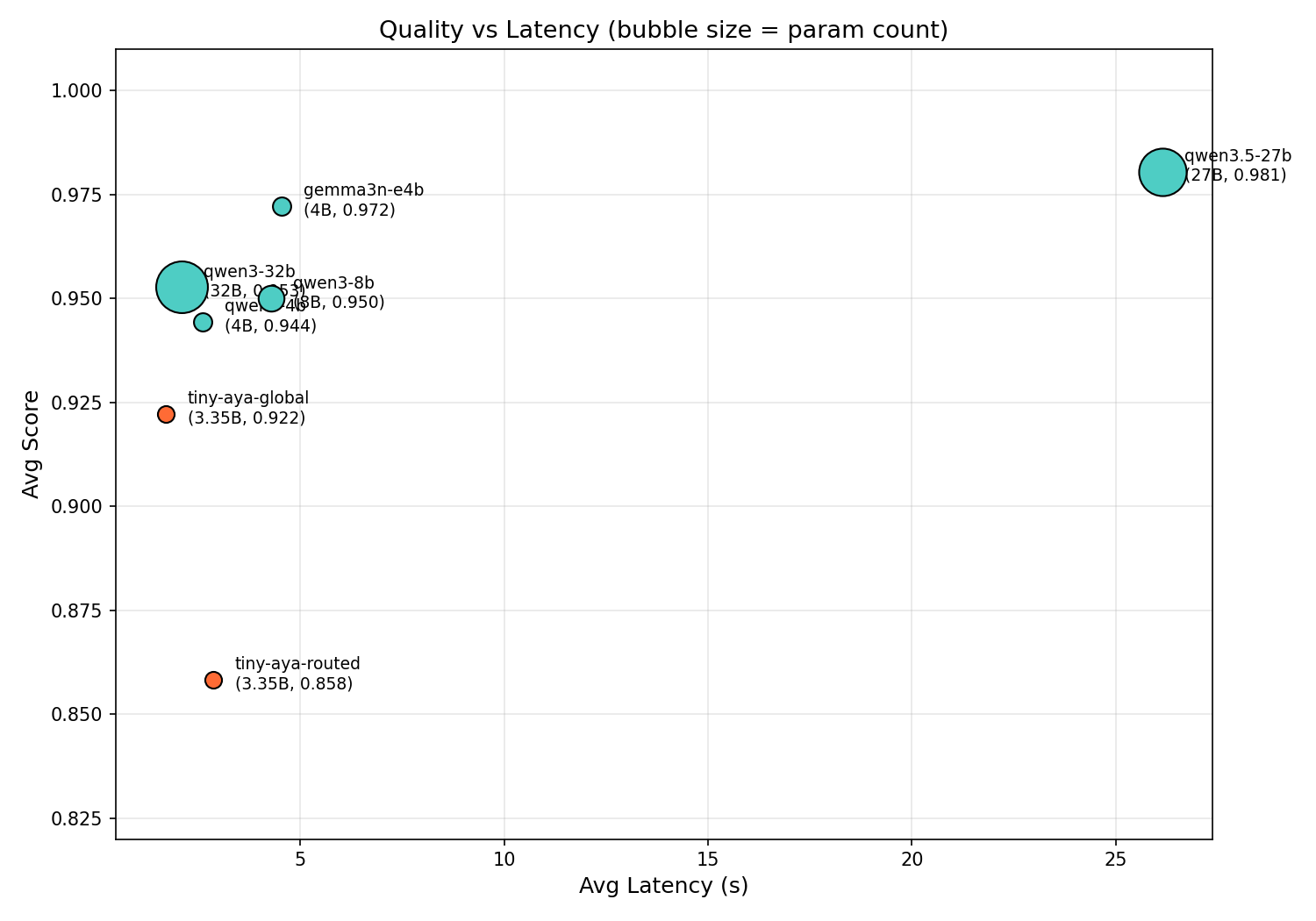
| Model | Params | Avg Score | Avg Latency |
|---|---|---|---|
| Qwen3.5-27B | 27B | 0.981 | 26.2s |
| Gemma3n-E4B | ~4B | 0.972 | 4.5s |
| Qwen3-32B | 32B | 0.953 | 2.1s |
| Qwen3-8B | 8B | 0.950 | 4.3s |
| Qwen3-4B | 4B | 0.944 | 2.6s |
| TinyAya-Global | 3.35B | 0.922 | 1.7s |
| TinyAya-Routed | 3.35B | 0.858 | 2.9s |
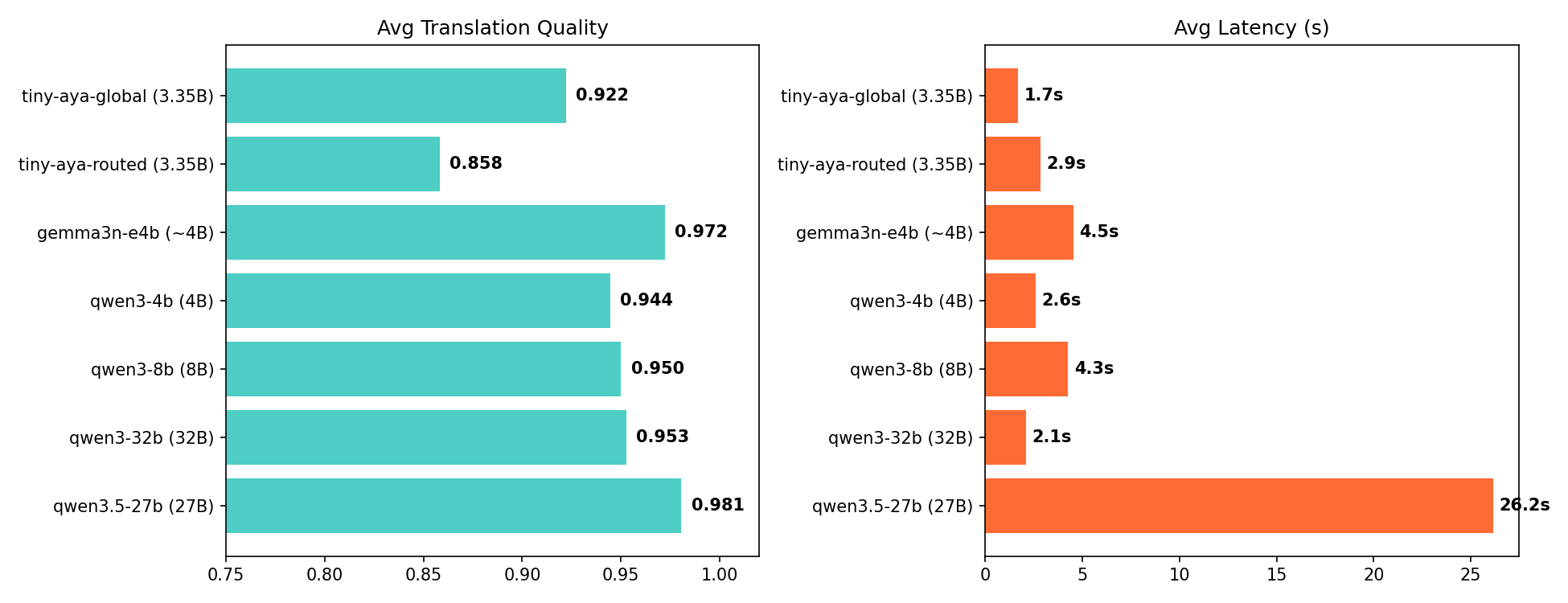
TinyAya-Global scores 0.922, within 3 to 6% of models up to 10x its size, at the fastest inference speed in the comparison. At 1.7 seconds per ticket, that is roughly 2,000 tickets per hour. Qwen3.5-27B scores 0.981 but at 26.2 seconds per ticket, so about 137 per hour.
The efficiency gap is even wider:
| Model | Score/Second | Score/Param |
|---|---|---|
| TinyAya-Global | 0.546 | 0.275 |
| Qwen3-32B | 0.455 | 0.030 |
| Qwen3-4B | 0.362 | 0.236 |
| Qwen3-8B | 0.222 | 0.119 |
| Gemma3n-E4B | 0.214 | 0.243 |
| Qwen3.5-27B | 0.037 | 0.036 |
Highest score-per-second and score-per-parameter of any model tested. Nothing in the comparison is both faster and better.
Performance by language
| Language | TinyAya-Global | Qwen3.5-27B | Gemma3n-E4B |
|---|---|---|---|
| Arabic | 0.97 | 1.00 | 0.97 |
| French | 0.95 | 1.00 | 0.97 |
| Spanish | 0.97 | 0.97 | 1.00 |
| Hindi | 0.95 | 0.97 | 1.00 |
| Portuguese | 0.95 | 0.95 | 0.93 |
| Turkish | 0.90 | 1.00 | 0.95 |
| Japanese | 0.90 | 0.95 | 0.97 |
| Swahili | 0.88 | 0.97 | 1.00 |
| Chinese | 0.82 | 1.00 | 0.95 |
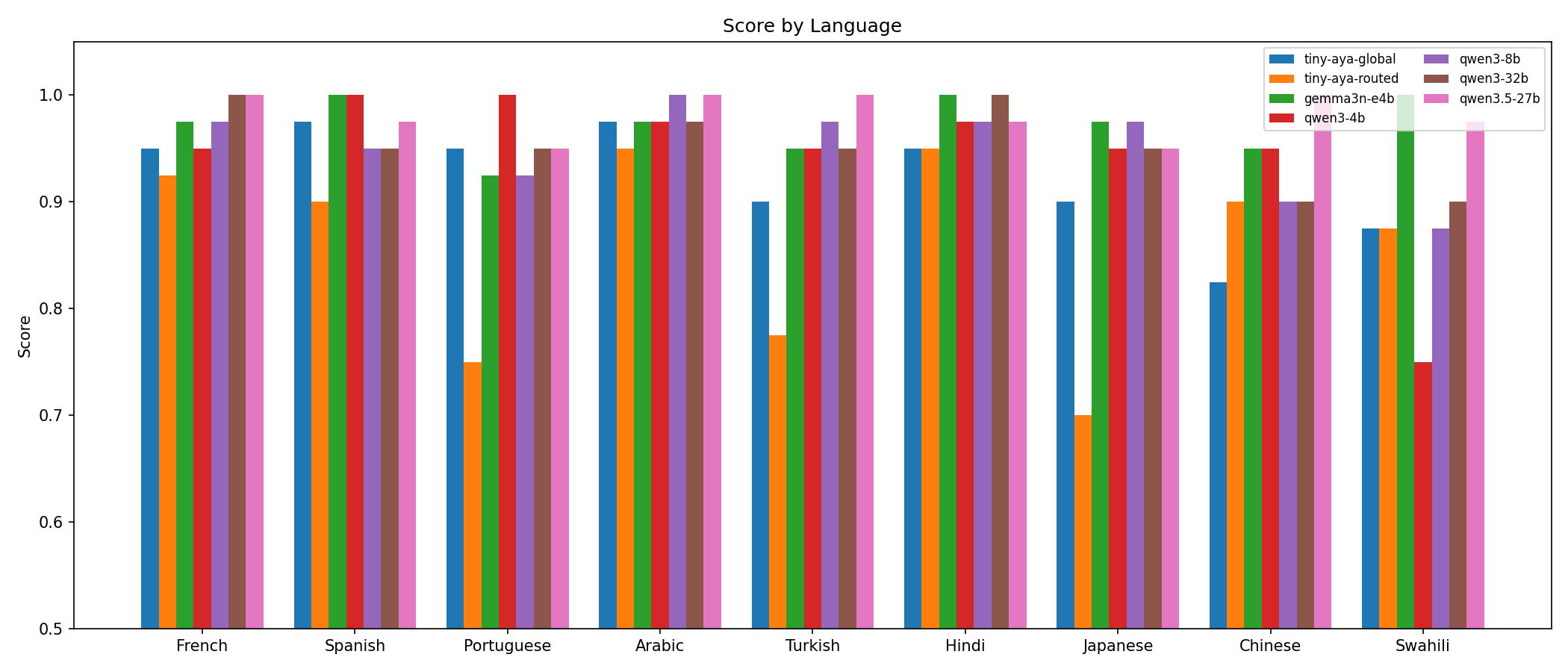
Strongest on Arabic (0.97), Spanish (0.97), French (0.95), Hindi (0.95), and Portuguese (0.95), all within 1 to 5% of the best model. The gap widens for Turkish (0.90), Japanese (0.90), Swahili (0.88), and Chinese (0.82). Chinese is the clearest weak point, 0.18 behind the best.
The consistency is the interesting part. Score distribution is tightly clustered. No catastrophic failures, no degenerate outputs. Every ticket produced a usable translation. For a production system, that consistency matters more than occasional peak scores.
Global vs routed
One of the more surprising findings. We expected routing to the regional variant would outperform the global model on its home languages. It mostly did not.
| Language | Variant | Global | Routed | Diff |
|---|---|---|---|---|
| Chinese | water | 0.82 | 0.90 | +0.08 |
| Hindi | fire | 0.95 | 0.95 | 0.00 |
| Swahili | earth | 0.88 | 0.88 | 0.00 |
| Arabic | earth | 0.97 | 0.95 | -0.03 |
| French | water | 0.95 | 0.93 | -0.02 |
| Spanish | water | 0.97 | 0.90 | -0.07 |
| Turkish | earth | 0.90 | 0.78 | -0.12 |
| Portuguese | water | 0.95 | 0.75 | -0.20 |
| Japanese | water | 0.90 | 0.70 | -0.20 |
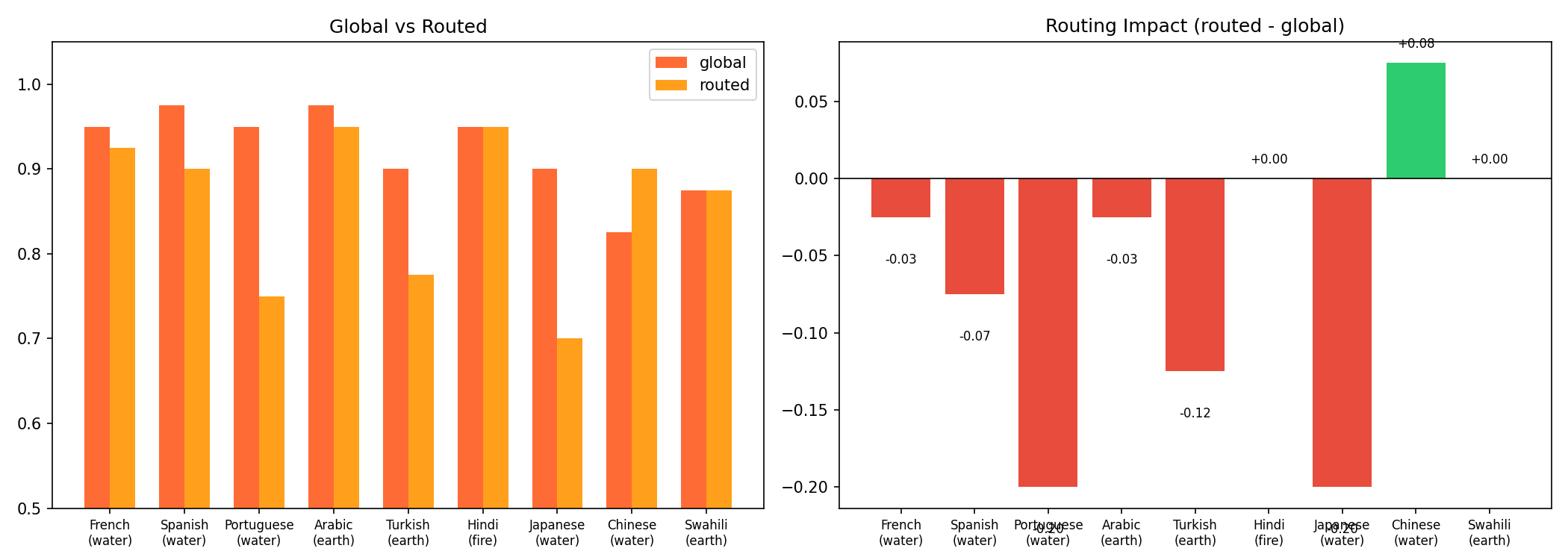
Global scored 0.922 versus 0.858 for routed. The global model was more consistent, the routed approach more variable.
This comes down to task fit. The regional variants are designed for deeper linguistic grounding and cultural nuance, which matters for open-ended generation and culturally sensitive content. Our task is structured technical translation with strict output formatting. The global model's broader instruction-following training gave it an edge here.
The exception was Chinese, where routing to Water improved the score from 0.82 to 0.90. That suggests a middle ground: use global as default, route only the languages where it demonstrably underperforms. That is exactly what our dual-translation architecture enables.
Both configurations use a 3.35B model. The fact that we are debating routing strategies between variants of a model this small, with scores in the 0.85 to 0.92 range, says something about where small multilingual models are at right now.
What we learned
Small models can compete on real tasks. TinyAya-Global at 3.35B is within 3 to 6% of models 8 to 10x its size on technical translation. The gap is real but narrow. And the 15x speed advantage over larger models changes what is possible: 2,000 tickets/hour versus 137.
Consistency beats peak performance. TinyAya-Global never catastrophically failed across 36 translations. Every output was usable. The routed approach occasionally scored higher but also dropped as low as 0.10. In production, the system that consistently scores 0.92 is more useful than the one that alternates between 0.95 and 0.50.
Eval design is harder than it looks. Our first run gave every model near-perfect scores (rubric was too lenient). Our second run penalized harmless model preamble as "hallucination," scoring good translations at 0.05. It took several iterations to get scores that actually differentiated model quality. Spot-checking would never have revealed the routing underperformance, the Chinese exception, or the failure modes of each variant.
Platform infrastructure is undifferentiated work. We spent our time on agent logic and eval design, not on building a serving layer or debugging Jira auth. The MCP integration turned what would have been hundreds of lines of API client code into three lines. For teams building agents, an open-source platform that handles the rest lets you focus on the parts that matter to your problem.
Model families are a design tool. Tiny Aya's structure (global backbone plus regional specialists) directly shaped our architecture. The dual translation step exists because the model family makes it possible. Routing underperformed global in our eval, but the architecture is sound. With different tasks (open-ended generation, culturally sensitive content), the regional variants' deeper grounding could make the difference.
Try it yourself
The code, eval suite, and results are all open source:
If you run this eval on your own data and get different results, we would be curious to hear about it.